
In this guide
What you will complete
You will create a Ghost Custom Integration, connect its Admin API key, and confirm that Rankboard can create a draft.
- 1Create a Ghost Custom Integration
- 2Open Rankboard integrations
- 3Add the site URL and Admin API key
- 4Connect and test a reviewed article
What you need
Collect these details before you start the connection.
- Site URL
- https://yourpublication.com
- Credential
- Ghost Admin API key
- Integration
- A Custom Integration created in Ghost Admin
Connect Ghost
Complete each step in order. Provider screenshots link to their original documentation.
- 1
Create a Ghost Custom Integration
In Ghost Admin, select Settings → Integrations → Add custom integration. Name the integration Rankboard.
Copy the Admin API key. Do not copy the Content API key because it cannot create or update posts.
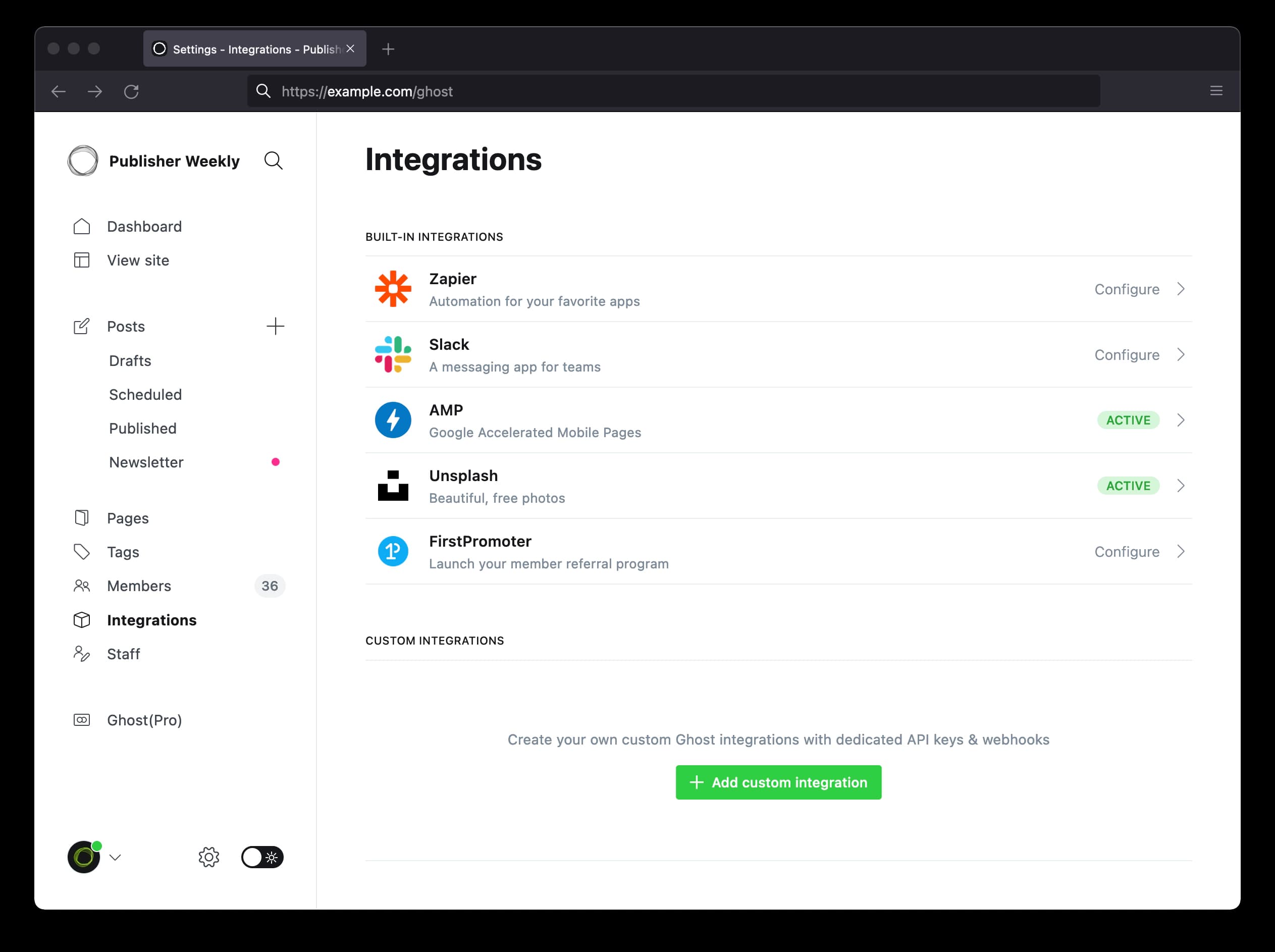
Open Integrations in Ghost Admin and select Add custom integration. Source: Ghost documentation ↗ 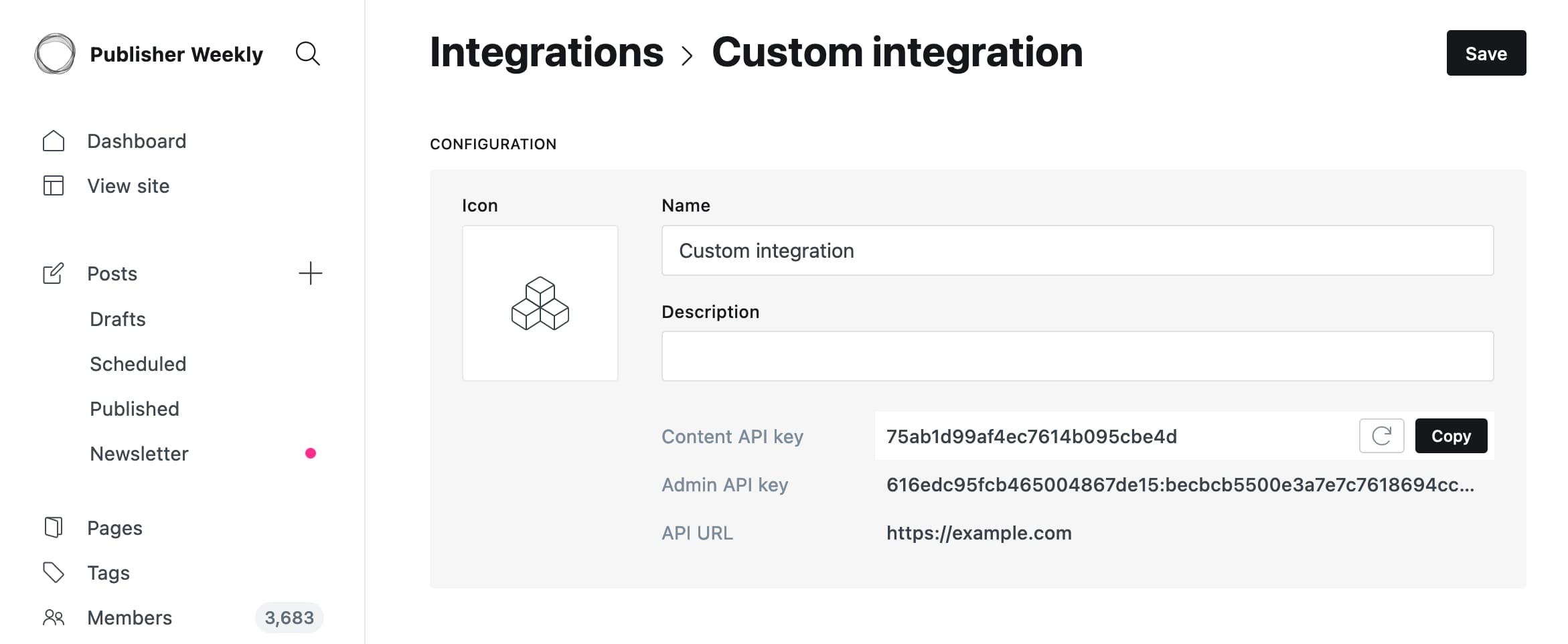
After creating the integration, copy the Admin API key, not the Content API key. Source: Ghost documentation ↗ - 2
Open Rankboard integrations
Open the matching Rankboard project. Select Settings → Integrations, then choose Ghost.
- 3
Add the site URL and Admin API key
Use the public Ghost publication URL. Rankboard normalizes URLs that include /ghost or /ghost/api/admin, but the plain publication URL is easiest to audit later.
- 4
Connect and test a reviewed article
Select Connect Ghost, then send one reviewed article as a draft. Confirm the post in Ghost Admin before you change the Rankboard publishing mode to Published.
Data Rankboard sends
Review the data this integration reads or writes before you connect it.
- Title, slug, rendered HTML, and meta description
- Draft or published status
- Feature image and alternative text when available
- Supported JSON-LD schema through Ghost head code injection
- Updates to the same Ghost post after its first successful sync
Confirm the connection works
Run one draft test and verify the result before you enable direct publishing.
- When saving, Rankboard signs a short-lived Ghost Admin token and checks the Admin API.
- A successful article sync returns a Ghost post ID and, when published, its public URL.
- Confirm the post status, feature image, metadata, and rendered body in Ghost Admin.
Fix common connection errors
Match the error to the issue below, then retry the connection.
The Admin API key is rejected.
Copy the Admin API key from the Custom Integration again. It contains an ID and secret separated by a colon. A Content API key will not work.
The site URL is rejected or redirects unexpectedly.
Use the canonical HTTPS publication URL. If Ghost Admin uses a separate admin domain, use the URL shown by the Custom Integration and confirm it is reachable from the public internet.
An existing post cannot be updated.
Confirm the post still exists and that the Custom Integration is active. Rankboard reads Ghost's latest update timestamp before sending an update to avoid overwriting a conflicting edit.
Protect your credentials
Limit access, keep secrets private, and revoke credentials when the connection is no longer needed.
- Treat the Admin API key as a secret and never place it in browser code or a public repository.
- Use a dedicated Custom Integration so access can be revoked without affecting other services.
- Delete the Custom Integration in Ghost and disconnect it in Rankboard to remove access.
Read the Privacy Policy and Terms & Conditions for service-wide data terms.
Check the official documentation
Use these provider resources when an interface or policy changes after this guide is reviewed.